

If you encounter a Gmail storage full warning, don’t look for the solution only in your inbox. Gmail, Drive, and Google Photos use the same Google account storage. Google’s August 2026 price increase covering Türkiye also provides a current justification to review existing files before purchasing additional space. In this article, you will find out how to find large emails, what to pay attention to when deleting photos, and how to check your account after cleaning. You can follow the processes in the computer browser and also edit the photo and WhatsApp backup settings on your Android phone. iPhone users can also clean their Google account through the browser.
- 1
Find out which service is taking up Gmail storage
First, open the Google One storage page and sign in with the Google account you are having trouble with. Examine the space occupied by Gmail, Google Drive and Google Photos in the usage distribution. Then go to the storage management page and check the cleaning categories such as large files. For example, if the area is mainly filled with videos, you can review your video archive instead of having to deal with deleting a few small e-mails. If you are using more than one account, verify the email address from the profile icon; This way you won’t do the cleaning on the wrong account.
Google offers up to 15GB of free storage on personal accounts; You can check the current limit of your account on the usage screen. Once you reach this limit, you won’t be able to send or receive emails from Gmail, upload new files to Drive, or back up new content to Google Photos. Therefore, having free space on your phone does not mean that your Google account is also empty. If you’re using a work or school account, your institutional administrator determines the storage quota; Do not apply the personal account limit to your corporate account.
- 2
Find large emails in Gmail with search commands
Open Gmail on your computer and type has:attachment larger:10M in the search box at the top. With this command, you can find emails with attachments whose total message size is larger than 10 MB. You can use the older_than:2y has:attachment command to review older attached messages. When you want to focus on PDF attachments, you can search for messages containing PDFs larger than 5 MB by typing filename:pdf larger:5M. These criteria do not indicate that a file is unnecessary; Open and check invoices, contracts and documents you want to keep before deleting them.
Download the attachments you need to your computer and make sure you can open the files. Then check the checkboxes next to the junk messages and click the delete icon at the top. If necessary in the left menu Other expand the section, BinOpen and review the content one last time. Permanently delete only messages you’ve given up on; Before completely emptying the trash, verify that you have no messages left to keep. You can also check your spam folder to clear unnecessary messages.
- 3
Clean up large files in Google Drive storage
Open Google Drive and click on the left menu storage space Enter the section. In this view, you can see the files that take up the most space at the top. Review old video uploads, archives you no longer use, and unnecessary copies of the same content. After downloading the file you want to keep, verifying its local copy, right-clicking on the unnecessary copy in the cloud Move to trash You can use the option.
Files you move to the trash bin in Drive continue to take up space in your quota until you delete them permanently. From the left menu BinOpen , and after checking your deletion decision, remove the relevant files permanently. When you permanently delete a shared file that you own, other users also lose access. Removing someone else’s file from your own list does not free up space in your quota; Concentrate the cleaning on the files you own.
- 4
Separate cloud space and phone memory in Google Photos
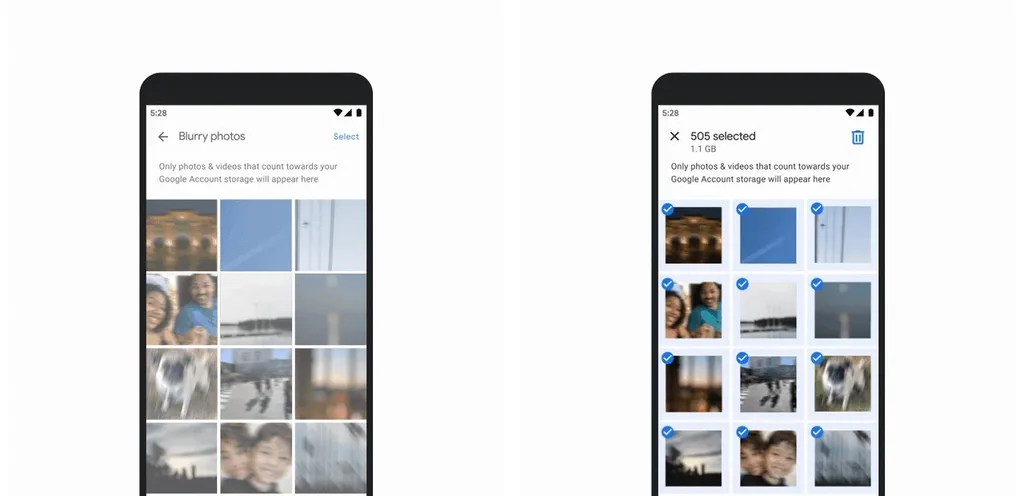
Open Google Photos on your Android phone, tap your profile picture and Photos settings > Backup > Manage storage Follow your path. You can determine the content you do not want to keep by reviewing the suggested categories, such as large photos and videos. If you are using a computer or iPhone, you can continue photo cleaning from the browser by opening the Google One storage manager. However, in practice Free up space on this device Do not confuse its function with clearing the quota of the Google account. This function frees the device memory by removing copies of the content you have backed up on the phone; It stores copies in the cloud.
Before deleting photos, make a separate copy of the content you want to keep on your computer or external drive. Deletion in the Google Photos app may also affect copies on connected devices where backup is turned on. If you just want to remove the cloud copy and keep the one on the phone, follow Google’s cloud deletion instructions; This process requires turning off backup on all relevant devices. Turning the backup on again may cause the content to be reinstalled or the local copy to be deleted. Additionally, you cannot gain space by deleting old content that does not exceed your quota; See space gain information in the management tool.
- 5
Check WhatsApp backups and Gmail rework
If you’re on Android, on WhatsApp Settings > Chats > Chat backup Open the section. If you want to protect the videos separately, first make independent copies, then Include videos You can reduce the size of the next backup by turning off the option. Start a backup with the new settings and verify that the application completes the process. Don’t haphazardly delete an existing cloud backup just to save space; Changing your phone or reinstalling WhatsApp without creating a new backup may cause you to lose your chat history.
Once the cleaning is finished, check the usage status of the same account on Google One again. Google notes that when you delete a large number of files together, it may take 48 to 72 hours for the storage indicator to update. When free space appears, send a test message to your Gmail address from a different email account and reply from Gmail as well. Ask the sender to resend important messages that bounce when your account is full. Check the backup status by tapping the profile icon in Google Photos; Even if you free up space, you cannot upload your new photos to the cloud with the closed backup setting.
Frequently asked questions about Gmail storage
There are too few messages in Gmail, why is the storage full?
Gmail, Google Drive and Google Photos use the same account quota. WhatsApp backups on Android also join this field. You can see which service is consuming space by opening Google One usage distribution.
If I remove photos from my phone, will I free up space in Gmail?
Simply removing local copies on the phone will not free up space on the Google account. Google Photos’ device freeing function also protects cloud copies. For Gmail quota, you need to manage cloud contents that consume storage in the account.
I deleted emails, why does Gmail still show up?
First check that you have cleared the correct account and also removed unnecessary messages from the trash. Then look at using other services through Google One. After deleting a large number of files, you may need to wait Google’s 48 to 72 hour period for the indicator to update.