

Steps to check spam protection, block suspicious senders, and edit notifications in Google Messages. The difference between the new Gemini-supported protections and the existing options is also in this guide.
Messages such as “Your cargo could not be delivered”, “Your account will be closed” or “Complete your payment” may cause you to make hasty decisions on the phone screen. The first checkpoint against these messages on Android is the protection settings of the SMS application you are using. If you use Google Messages, you can check the spam filter, block suspicious senders, and turn off link previews.
This guide is based on the Google Messages app; Menus change in different applications such as Samsung Messages. The new Gemini protections, announced by Google on October 14, 2026, create a separate layer from the existing settings. Therefore, even if you cannot see the new feature on your phone, there are controls you can use today.
Turn on spam protection in Google Messages
First, check if there are updates for Google Messages on the Play Store. Then your phone Settings > Applications > Default applications > SMS application Select Google Messages from the section. Menu names may vary depending on the manufacturer; The important thing is to verify which application manages the SMS.
The current spam protection method in Google’s Turkish support document is as follows. This option appears only on supported devices. Follow the order below to check:
- Open Google Messages.
- Tap your profile photo or initial in the top right.
- Messages settings > Protection and security > Spam protection Open the section.
- Enable spam protection Turn the switch to the on position.
Google states that it can automatically enable spam protection when available. Still, seeing the switch on is the direct way to check the setting. The filter may move suspicious messages to the spam folder or prevent them from being delivered; Don’t assume it will catch all fraudulent attempts.
Don’t think of spam protection as a feature that works entirely offline. Google uses connection checks alongside on-device models and can send the URL in the message to its servers to verify whether it is malicious or not. For this reason, the data processing method of the current spam filter and the new Gemini features should not be considered the same.
Block suspicious sender, unblock wrong block
If a message from a number you don’t recognize is suspicious, you can block the sender without opening the connection. According to Google’s blocking instructions, press and hold the relevant conversation on the home screen. block Just tap the option. Complete the process on the confirmation screen that opens.
To move through the conversation More options > Details > Block and report as spam You can use the path. If you are offered the option to report spam, consider separately whether to send a report. The spam report can forward copies of the last 10 messages from the sender to Google; It is not mandatory to send a report just to block the number.
Interview after the procedure Spam and blocked Check in the section. If you accidentally blocked a person you trust, open the conversation from this list. unblock Tap . Google states that when the block is removed, the conversation returns to the home screen.
Just as not every unknown number is a scam, not every sender that looks familiar can be trusted. Check the sender’s claim through an independent channel, especially in messages asking for money, password or verification code. Opening the bank’s application yourself or calling the institution’s known number provides a more controlled way than proceeding with the link provided by the message.
Check links and message notifications
If a link asks for a shipping fee or account verification, first investigate whether the request is actually yours. Do not share your password, card information or single-use code through the link in the message. Google’s anti-phishing recommendations emphasize that links from untrusted senders should be approached with caution, even if the warning does not appear.
If you don’t want to see connection cards Messages settings > Automatic previews Open the section. here Show all previews You can turn off the option. This does not block or secure the connection; It only changes how the preview is shown.
To reduce alerts for a specific conversation More options > Details > Notifications > Silent You can follow the path. Muting is different from blocking the sender and does not stop messages from arriving. Managing the problematic conversation rather than turning off notifications for the entire app allows you to keep notifications of other messages.
These controls are explained separately in Google’s notification settings document. When you want to undo the setting, you can re-select the sound alerts from the same notification screen. To see the previews again, just turn on the switch you turned off.
Why the new Gemini protection may not appear on your phone
In Google’s October 14 announcement Enhanced protectiona new optional setting. The company says distribution will take place in the coming weeks. This setting supports the existing Fraud Detection feature with Gemini models in the cloud via Private AI Compute; also improving connectivity analysis with Gemini Nano on eligible devices.
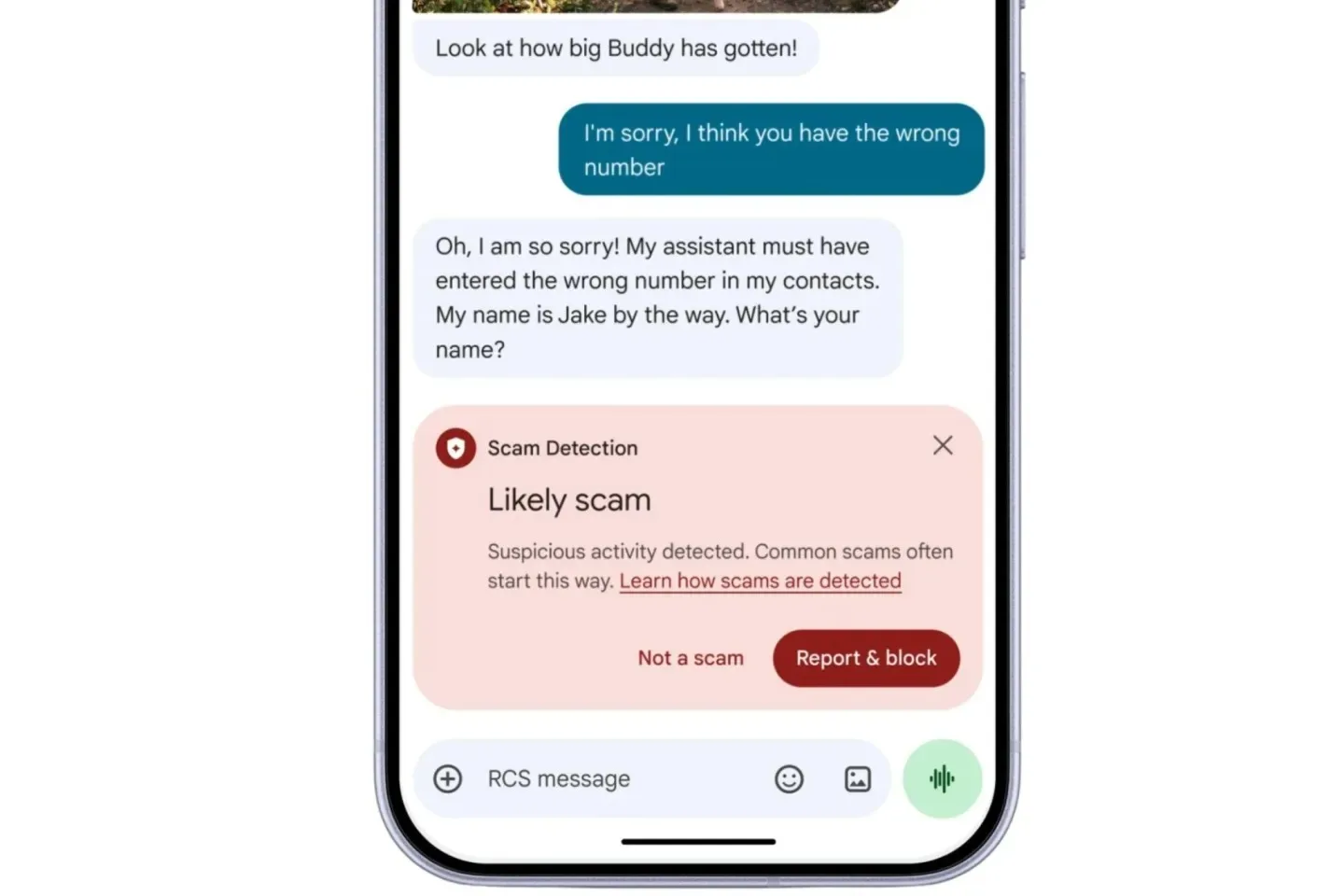
Google explains different device scopes for cloud-assisted detection and advanced link analysis. Therefore, using an updated Android version does not mean that all new protections come to your phone. Since the announcement does not guarantee general availability for Türkiye and Turkish, do not try to implement an unlock path that has not yet been verified.
Android fraud alerts, which examine notifications from other chat applications, are also a separate feature. Türkiye and Turkish are not included in Google’s support list as of October 16, 2026. Just because you don’t see these alerts on your phone doesn’t mean that the spam filter in Google Messages is turned off.