

Apple HomeView might make sense for those who need a fixed screen that’s easy for everyone in the house to reach. However, it makes more sense for those who are looking for a new device just to listen to music, get the weather forecast or make occasional video calls, to first consider their existing phones and tablets. For users in Türkiye, another condition is added to the purchasing decision: Türkiye is not among HomeView’s initial sales countries, and initial Siri AI support does not include Turkish.
HomeView’s difference is that it sits in a common place at home.
On Apple’s product page, HomeView is described as a shared display that recognizes up to six users. In addition to facial recognition for personal content, there are conditions such as the paired iPhone or iPad being connected to the same Wi-Fi network and being recently unlocked. Guests can use music, meters and home controls without accessing personal information.
Consider the practical equivalent of this in the kitchen. While preparing a meal, you always return to the same screen to look at the recipe, make a video call, and control the door camera. Another member of the house can also use this shared device without asking for your own phone. The convenience you buy here is the collection of transactions in a place accessible to everyone, rather than a single transaction not on your phone.
But for this scenario to work, that point needs to be actually useful. A corner where you cannot see the screen easily, insufficient counter space in the kitchen, or a lack of a socket in a suitable place may reduce the frequency of use. Before ordering, determining where you will place the device is more important than choosing the color.
What changes when there is an iPhone and an iPad?
If your phone is always with you, walking to a separate screen to turn on a single lamp may not save you time. If your smart home consists of a few simple controls, sticking with your existing device is a strong option. What would justify HomeView would have to be tasks that are frequently repeated at home and require shared access.
Usage habits are also decisive in iPad comparison. If you’re following recipes, making video calls, and watching videos on your tablet, first look at where you’re doing these things. If you use the same tablet to work, read or produce content in another room, you may not want to dedicate it to the kitchen. However, if you already have an iPad that you are not using, trying out the home screen idea with the existing device will help you better understand your needs. This trial does not mean that the iPad offers all the features of HomeView.
According to the official specifications, both HomeView models require wired power. Therefore, do not think of it as a tablet that you will pick up, sit on the couch, and then put it in your bag. If you allocate a budget for a single screen at home and care about portability, the iPad may be more suitable for use.
Does it replace Apple TV for watching videos?
There is an important software detail here. Built-in apps in HomeView’s spec include Music, Podcasts, and Safari. The TV application is listed in the applications group accessed from iPhone. Apple states that compatible third-party audio and video applications can also be used on iPhone.
Apple TV 4K is a device for experiencing movies, TV series and games on your television. If you are going to watch content in the living room for a long time, make your decision based on the television, the applications you use and your current player. Considering HomeView’s seven-inch screen as an alternative to this setup would be confusing two different uses. If your existing Apple TV does the job, there’s no reason to replace it with HomeView.
Your smart home setup should be at the center of the decision
HomeView brings the controls and camera views of compatible home accessories to the common screen. However, simply adding a screen to an empty home does not automatically create a comprehensive smart home. You should also verify the compatibility of any lights, cameras or other accessories you want to control.
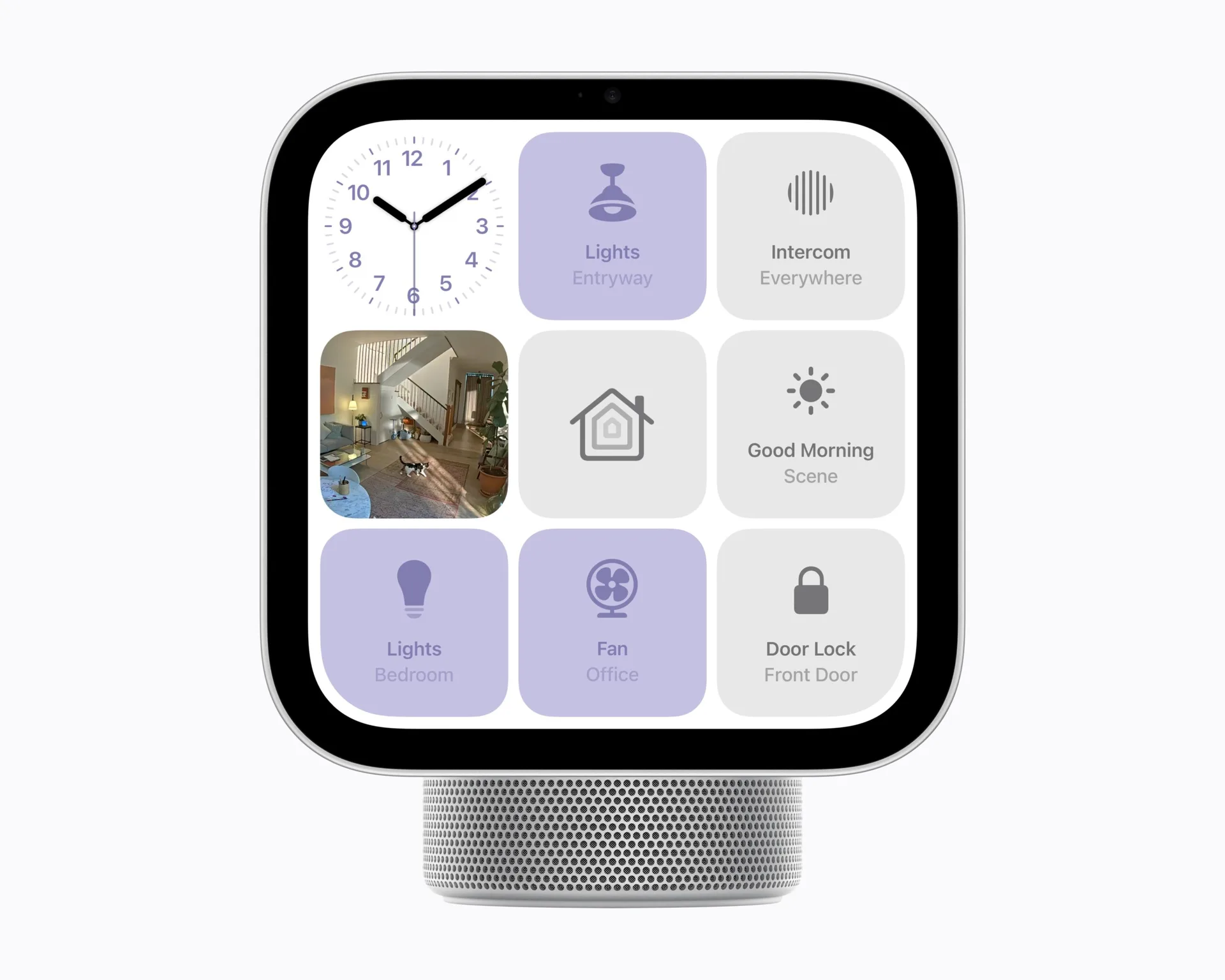
First, make a list: Which camera do you want to see on the screen, which room do you want to control, which task do you want to do how many times? If your list consists of a few infrequently used actions, you can postpone the purchase. The value of a shared display increases if different family members access the same controls repeatedly throughout the day. It is healthier to test the reason for purchasing with the devices you use today rather than the system you may install in the future.
Also, if you do not live alone, evaluate the decision together with those at home. The voice usage you like may not suit someone else’s habits. Discussing in advance the location of the shared screen, what information will appear and who will use it can prevent the device from being forgotten in a corner of the house.
There are concrete reasons to wait in Türkiye
According to Apple’s October 13 announcement, the US price of the desktop and wall models is $ 299, and the sales date in the first markets is November 13. Türkiye is not on this list. Announced Siri AI support starts with English in certain countries. Actions that require personal context also require a paired iPhone or iPad with Apple Intelligence support.
Therefore, do not consider being able to use English and supporting all functions in Türkiye as the same thing. If you are looking for a helper for your Turkish-speaking household, do not rely on future language support. When considering an imported product, it would be an incomplete comparison to rely only on the dollar tag without clarifying the local sales price, service conditions and availability.
The power adapter, cable and compatible mounting bracket for the wall model are sold separately. For the desktop model, cable and adapter are included in the box. When calculating the total installation, add this difference and any subscriptions to the services you will use.
As a result, HomeView is a product that can be evaluated by Apple users who can already describe the need for a common screen. It may not be a priority purchase for someone who does their work comfortably with their phone, wants a portable tablet, or just listens to music. In Turkey, the most reliable approach is to wait for local conditions and real use tests. First determine what task at home it will make easier, then see if that convenience is worth the total cost.